Bootstrap 5 Tutorial

BS5 Typography


Bootstrap 4 Default Settings

The font-size and line-height defaults for Bootstrap 5 are 1rem (16px) and 1.5, respectively.

Furthermore, margin-bottom: 1rem (16px by default) and margin-top: 0 are applied to every <p> element.


-

HTML headings (<h1> to <h6>) styled using Bootstrap 4 With a larger font size and a bolder font weight:

Example

h1 Bootstrap heading

h2 Bootstrap heading

h3 Bootstrap heading

h4 Bootstrap heading

h5 Bootstrap heading
h6 Bootstrap heading3

If desired, you can additionally apply the .h1 to .h6 classes to other components to make them function as headings:

Example

				
					<p class="h1">h1 Bootstrap heading</p>
<p class="h2">h2 Bootstrap heading</p>
<p class="h3">h3 Bootstrap heading</p>
<p class="h4">h4 Bootstrap heading</p>
<p class="h5">h5 Bootstrap heading</p>
<p class="h6">h6 Bootstrap heading</p>


Display Headings

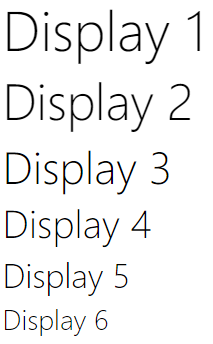
There are six classes of display headings, which are used to stand out more than regular headings (bigger font-size and lighter font-weight): .display-1 to .display-6:

Example

BS5 Typography -

Using the .small class and the HTML <small> element, Bootstrap 5 allows you to add a smaller secondary text to any heading:

Example

h1 heading secondary text

h2 heading secondary text

h3 heading secondary text

h4 heading secondary text

h5 heading secondary text
h6 heading secondary text

<mark> and .mark will be styled by Bootstrap 5 with a yellow background and some padding:

Example

Use the mark element to highlight text.

The HTML <abbr> element will be styled by Bootstrap 5 with a dotted border at the bottom and a hovering question mark-equipped cursor:

Example

The WHO was founded in 1948.

To quote content blocks from another source, add the .blockquote class to a <blockquote>. Additionally,-9 use the .blockquote-footer 8class when mentioning a source, such as “from WWF’s website”:

Example

For 50 years, WWF has been protecting the future of nature. The world’s leading conservation organization, WWF works in 100 countries and is supported by 1.2 million members in the United States and close to 5 million globally.


From WWF’s website

Using Bootstrap 5, the HTML <dl> element will be styled as follows:

Example

Coffee

– black hot drink

Milk

– white cold drink

The HTML <code> element will be styled as follows by Bootstrap 5:

Example

The following HTML elements: spansection, and div defines a section in a document.

The HTML <kbd> element will be styled as follows by Bootstrap 5:

Example

Use ctrl + p to open the Print dialog box.

The HTML <pre> element will be styled as follows by Bootstrap 5:

Example

Text in a pre element
is displayed in a fixed-width
font, and it preserves
both      spaces and
line breaks.

More Typography Classes

You can add the following Bootstrap 5 classes to further style HTML elements:

ClassDescriptionExample
.leadMakes a paragraph stand outTry it
.text-startIndicates left-aligned textTry it
.text-breakPrevents long text from breaking layoutTry it
.text-centerIndicates center-aligned textTry it
.text-decoration-noneRemoves the underline from a linkTry it
.text-endIndicates right-aligned textTry it
.text-nowrapIndicates no wrap textTry it
.text-lowercaseIndicates lowercased textTry it
.text-uppercaseIndicates uppercased textTry it
.text-capitalizeIndicates capitalized textTry it
.initialismDisplays the text inside an <abbr> element in a slightly smaller font sizeTry it
.list-unstyledRemoves the default list-style and left margin on list items (works on both <ul> and <ol>). This class only applies to immediate children list items (to remove the default list-style from any nested lists, apply this class to any nested lists as well)Try it
.list-inlinePlaces all list items on a single line (used together with .list-inline-item on each <li> elements)Try it
Share this Doc

BS5 Typography

Or copy link

Explore Topic