
Dart Operators
An operator is a symbol that is used to operate on its operand or manipulate values. The supplied equation is 5+4, where “+” denotes the operator and the operands are 5 and 4.
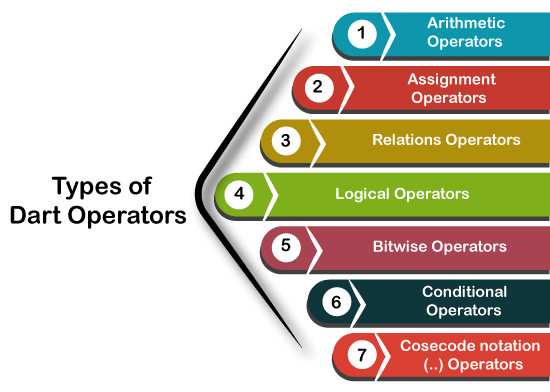
To perform a wide range of activities, Dart comes with a large collection of built-in operators. Operators can be either binary or unary, meaning that a binary operator takes two operands along with it, and a unary operator takes just one. Operators come in several varieties. The list of dart operators is provided below.
Types of Operators
These are the operator types that Dart supports.
- Arithmetic Operators
- Assignment Operators
- Relational Operators
- Type test Operators
- Logical Operators
- Bitwise Operator
- Conditional Operators
- Casecade notation(..) Operators
Dart Arithmetic Operators
The most often used operators for addition, subtraction, multiplication, division, and other operations are arithmetic operators. If variable a holds 20 and variable b holds 10, as an example –
| Sr. | Operator Name | Description | Example |
|---|---|---|---|
| 1. | Addition(+) | It adds the left operand to the right operand. | a+b will return 30 |
| 2. | Subtraction(-) | It subtracts the right operand from the left operand. | a-b will return 10 |
| 3 | Divide(/) | It divides the first operand by the second operand and returns quotient. | a/b will return 2.0 |
| 4. | Multiplication(*) | It multiplies the one operand to another operand. | a*b will return 200 |
| 5. | Modulus(%) | It returns a reminder after dividing one operand to another. | a%b will return 0 |
| 6. | Division(~/) | It divides the first operand by the second operand and returns integer quotient. | a/b will return 2 |
| 7. | Unary Minus(-expr) | It is used with a single operand changes the sign of it. | -(a-b) will return -10 |
Example
					void main(){
  print("Example of Assignment operators");
  var n1 = 10;
  var n2 = 5;

  print("n1+n2 = ${n1+n2}");
  print("n1-n2 = ${n1-n2}");
  print("n1*n2 = ${n1*n2}");
  print("n1/=n2 = ${n1/n2}");
  print("n1%n2 = ${n1%n2}");
}
Output
					Example of Arithmetic operators
n1+n2 = 15
n1-n2 = 5
n1*n2 = 50
n1/=n2 = 2
n1%n2 = 0
Dart Unary Operators (post and pre)
The operators ++ and –, which are also referred to as unary operators in Java, are increment and decrement operators, respectively. Unary operators work with a single operand; ++ adds one to the operand and — subtracts one from the operand.
There are two applications for unary operators: postfix and prefix. When ++ is used as a postfix (e.g., x++), the operand value is returned first, and the value of x is subsequently increased. The value of x is increased when — is used as a prefix (such as ++x).
| Sr. | Operator Name | Description | Example |
|---|---|---|---|
| 1. | ++(Prefix) | It increment the value of operand. | ++x |
| 2. | ++(Postfix) | It returns the actual value of operand before increment. | x++ |
| 3. | –(Prefix) | It decrement the value of the operand. | –x |
| 4. | –(Postfix) | It returns the actual value of operand before decrement. | x– |
Example
					void main() {
   var x = 30;
   print(x++);                  //The postfix value

var y = 25;
print(++y);                 //The prefix value,

var z = 10;
print(--z);                  //The prefix value

var u = 12;
   print(u--);    }           //The postfix value
Output
					30
26
9
12
Assignment Operator
Variables are assigned values through the use of assignment operators. It can be utilized in conjunction with the arithmetic operators as well. Below is a list of assignment operators. Assume that an is worth 20 and b is worth 10.
| Operators | Name | Description |
|---|---|---|
| = (Assignment Operator) | It assigns the right expression to the left operand. | |
| +=(Add and Assign) | It adds right operand value to the left operand and resultant assign back to the left operand. For example – a+=b → a = a+b → 30 | |
| -=(Subtract and Assign) | It subtracts right operand value from left operand and resultant assign back to the left operand. For example – a-=b → a = a-b → 10 | |
| *=(Multiply and Assign) | It multiplies the operands and resultant assign back to the left operand. For example – a*=b → a = a*b → 200 | |
| /=(Divide and Assign) | It divides the left operand value by the right operand and resultant assign back to the left operand. For example – a%=b → a = a%b → 2.0 | |
| ~/=(Divide and Assign) | It divides the left operand value by the right operand and integer remainder quotient back to the left operand. For example – a%=b → a = a%b → 2 | |
| %=(Mod and Assign) | It divides the left operand value by the right operand and remainder assign back to the left operand. For example – a%=b → a = a%b → 0 | |
| <<=(Left shift AND assign) | The expression a<<=3 is equal to a = a<<3 | |
| >>=(Right shift AND assign) | The expression a>>=3 is equal to a = a>>3 | |
| &=(Bitwise AND assign) | The expression a&=3 is equal to a = a&3 | |
| ^=(Bitwise exclusive OR and assign) | The expression a^=3 is equal to a = a^3 | |
| |=(Bitwise inclusive OR and assign) | The expression a|=3 is equal to a = a|3 |
Example
					void main(){
 print("Example of Assignment operators");

  var n1 = 10;
  var n2 = 5;

  n1+=n2;
  print("n1+=n2 = ${n1}");

  n1-=n2;
  print("n1-=n2 = ${n1}");

  n1*=n2;
  print("n1*=n2 = ${n1}");

  n1~/=n2;
  print("n1~/=n2 = ${n1}");
  n1%=n2;
  print("n1%=n2 = ${n1}");
}
Output
					Example of Assignment operators
n1+=n2 = 15
n1-=n2 = 10
n1*=n2 = 50
n1~/=n2 = 10
n1%=n2 = 0
Relational Operator
When comparing two expressions and operands, relational or comparison operators are employed. The Boolean true and false are returned when two expressions are compared. Assuming that a can hold 20 and b can hold 10, look at the table below.
| Sr. | Operator | Description |
|---|---|---|
| 1. | >(greater than) | a>b will return TRUE. |
| 2. | <(less than) | a<b will return FALSE. |
| 3. | >=(greater than or equal to) | a>=b will return TRUE. |
| 4. | <=(less than or equal to) | a<=b will return FALSE. |
| 5. | ==(is equal to) | a==b will return FALSE. |
| 6. | !=(not equal to) | a!=b will return TRUE. |
Example
					void main() {
var a = 30;
var b = 20;

print("The example of Relational Operator");

var res = a>b;
print("a is greater than b: "+res. toString());  // We will learn the toString in next tutorial

var res0 = a<b;
print("a is less than b: "+res0. toString());

var res1 = a>=b;
print("a is greater than or equal to b: "+res1. toString());

var res2 = a<=b;
print("a is less than and equal to b: "+res2. toString());

var res3 = a!= b;
print("a is not equal to  b: "+res3. toString());

var res4 = a==b;
print("a is  equal to  b: "+res4. toString());
}
Output:
					The example of Relational Operator
a is greater than b: true
a is less than b: false
a is greater than or equal to b: true
a is less than and equal to b: false
a is not equal to  b: true
a is  equal to  b: false
Dart Type Test Operators
Runtime expression types are tested using the Type Test Operators. Take a look at the table below.
| Sr. | Operator | Description |
|---|---|---|
| 1. | as | It is used for typecast. |
| 2. | is | It returns TRUE if the object has specified type. |
| 3. | is! | It returns TRUE if the object has not specified type. |
Example
					void main()
{
  var num = 10;
  var name = "JavaTpoint";
  print(num is int);
  print(name is! String );
}
Output:
					true
false
Dart Logical Operators
In order to assess the phrases and get a conclusion, logical operators are utilized. The following logical operators are supported by Dart.
| Sr. | Operator | Description |
|---|---|---|
| 1. | &&(Logical AND) | It returns if all expressions are true. |
| 2. | ||(Logical OR) | It returns TRUE if any expression is true. |
| 3. | !(Logical NOT) | It returns the complement of expression. |
Example
					void main(){
  bool bool_val1 = true, bool_val2 = false;
  print("Example of the logical operators");

  var val1 = bool_val1 && bool_val2;
  print(val1);

  var val2 = bool_val1 || bool_val2;
  print(val2);

  var val3 = !(bool_val1 || bool_val2);
  print(val3);
}
Output:
					Example of the logical operators
false
true
false
Dart Bitwise Operators
The two operands’ values are operated upon bit by bit by the bitwise operators. The bitwise operators table is shown below.
Example
					If a = 7
b = 6
then binary(a) = 0111
binary(b) = 0011
Hence a & b = 0011, a|b = 0111 and a^b = 0100
| Sr. | Operators | Description |
|---|---|---|
| 1. | &(Binary AND) | It returns 1 if both bits are 1. |
| 2. | |(Binary OR) | It returns 1 if any of bit is 1. |
| 3. | ^(Binary XOR) | It returns 1 if both bits are different. |
| 4. | ~(Ones Compliment) | It returns the reverse of the bit. If bit is 0 then the compliment will be 1. |
| 5. | <<(Shift left) | The value of left operand moves left by the number of bits present in the right operand. |
| 6. | >>(Shift right) | The value of right operand moves left by the number of bits present in the left operand. |
Example
					void main(){
  print("Example of Bitwise operators");

  var a  = 25;
  var b = 20;
  var c = 0;

  // Bitwise AND Operator
  print("a & b = ${a&b}");

  // Bitwise OR Operator
  print("a | b = ${a|b}");

  // Bitwise XOR
  print("a ^ b = ${a^b}");

  // Complement Operator
  print("~a = ${(~a)}");

  // Binary left shift Operator
  c = a <<2;
  print("c<<1= ${c}");

  // Binary right shift Operator
  c = a >>2;
  print("c>>1= ${c}");
}
Output
					Example of Bitwise operators
a & b = 16
 a | b = 29
 a ^ b = 13
 ~a = 4294967270
 c<<1= 100
 c>>1= 6
Dart Conditional Operators (?:)
Similar to an if-else statement, a conditional operator has similar functionality to a conditional statement. It is the if-else statement in its second form. Additionally, “Ternary Operator” is mentioned. Below is the syntax.
Syntax 1
condition ? exp1 : exp2
It returns exp1 if the specified condition is TRUE and exp2 otherwise.
Syntax 2
exp1 ?? expr2
Return the value of the exp1 if it is not null, and the value of the exp2 if it is.
Example
					void main() {
   var x = null;
   var y = 20;
   var val = x ?? y;
   print(val);
}
Output
20
Let’s examine an alternative situation.
Example
					void main() {
   var a = 30;
   var output = a > 42 ? "value greater than 10":"value lesser than equal to 30";
   print(output);
}
Output
value lesser than or equal to 30
Let’s examine an alternative situation.
Dart Cascade notation Operators
To evaluate a sequence of operations on the same object, use the Cascade notation Operators (..). It is the same as the method chaining, however it saves multiple steps and eliminates the need to store results in temporary variables.

