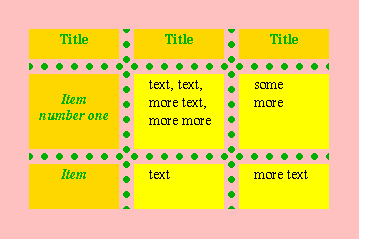
HTML table borders
CSS table borders
border property
border-collapse
border-radius
border-style
border-color
HTML
HTML5
HTML tutorials
Learn HTML
Free HTML tutorials
HTML Example
HTML Explained
HTML tables can be styled using various border properties to enhance their appearance and functionality. The border property in CSS allows you to control the width, style, and color of table borders.
The border-width property specifies the thickness of the table border, which can be set in pixels, ems, or other length units. The border-style property determines the visual style of the border, such as solid, dashed, dotted, or double. The border-color property sets the color of the table borders.
Additionally, the border-collapse property can be used to control the spacing between table cells. Setting border-collapse to collapse will remove the spacing between cells, while separate will add spacing. The border-radius property can be used to add rounded corners to the table borders.
By understanding and properly utilizing these border-related CSS properties, web developers can create visually appealing and well-structured HTML tables that enhance the overall user experience of their web pages.
HTML tables are a fundamental element in web design, and understanding how to properly style their borders is crucial. The border property in HTML and CSS allows you to customize the appearance of table borders, making them an essential tool for creating visually appealing and well-organized content.
When working with table borders, you can control various aspects such as the border style, color, and width. The border-style property allows you to choose from a variety of border styles, including solid, dashed, dotted, and more. The border-color property lets you specify the color of the border, while the border-width property determines the thickness of the border.
Additionally, the border-collapse property can be used to control the spacing between table cells. Setting border-collapse to collapse will remove the spacing between cells, creating a seamless look. Conversely, setting it to separate will add spacing between the cells.
For advanced border styling, you can also utilize the border-radius property to create rounded corners on your table borders. This can be particularly useful for creating a modern and visually appealing design.
By mastering the use of HTML and CSS table borders, you can elevate the appearance and organization of your web content, making it more visually engaging and user-friendly.