
Parsing JSON Response
Parsing JSON Response
In the tutorial’s earlier section, we covered utilizing Alamofire to create get requests. Tableview was utilized in a project we worked on to display the artist’s details within the application.
We will build on that project in this phase of the course by developing a response model and parsing the response data within it.
Using the command + n short key, we must create a new swift file and choose it in order to generate the response model.
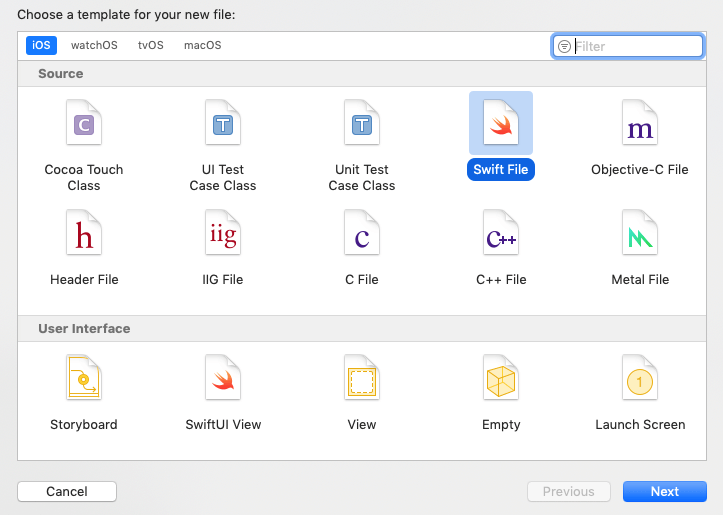
In Swift, the base class of Decodable should be the ArtistResponseModel class.
ArtistResponseModel.swift
					import Foundation

class ArtistResponseModel:Decodable{
    public var resultCount:Int?
    public var results:[Results]?
}

class Results : Decodable{
    public var wrapperType : String?
    public var kind : String?
    public var artistId : Int?
    public var collectionId : Int?
    public var trackId : Int?
    public var artistName : String?
    public var collectionName : String?
    public var trackName : String?
    public var collectionCensoredName : String?
    public var trackCensoredName : String?
    public var artistViewUrl : String?
    public var collectionViewUrl : String?
    public var trackViewUrl : String?
    public var previewUrl : String?
    public var artworkUrl30 : String?
    public var artworkUrl60 : String?
    public var artworkUrl100 : String?
    public var collectionPrice : Double?
    public var trackPrice : Double?
    public var releaseDate : String?
    public var collectionExplicitness : String?
    public var trackExplicitness : String?
    public var discCount : Int?
    public var discNumber : Int?
    public var trackCount : Int?
    public var trackNumber : Int?
    public var trackTimeMillis : Int?
    public var country : String?
    public var currency : String?
    public var primaryGenreName : String?
    public var isStreamable : Bool?
}
We will use JSONDecoder, an object that decodes instances of a data type from JSON objects, to parse the response in the Alamofire API request.
The JSON answer is decoded using JSONDecoder’s decode function. It decodes the value of the specified type from a JSON object and returns it. Below is the syntax.
func decode<T>(T.Type, from: Data) -> T
The ArtistResponseModel instance and the response data will be passed here. Below is the syntax.
					do{
let result: ArtistResponseModel = try JSONDecoder().decode(ArtistResponseModel.self, from: response.data!)
}
catch{
}
The parsed JSON response will be returned along with the ArtistResponseModel object.
The code is contained in the ViewController.swift file.
ViewController.swift
					import UIKit
import Alamofire

class ViewController: UIViewController {

    @IBOutlet weak var tableView: UITableView!

    var artist = Array<Results>()

    override func viewDidLoad() {
        super.viewDidLoad()
        // Do any additional setup after loading the view.
        loadJsonData()
        tableView.delegate = self
        tableView.dataSource = self
        //tableView.rowHeight = UITableView.automaticDimension
    }
    func loadJsonData()
    {
       Alamofire.request("https://itunes.apple.com/search?media=music&term=bollywood").responseJSON { (response) in
            //print("Response value \(response)")
        do{
            if(response.result.isSuccess){
                let result: ArtistResponseModel = try JSONDecoder().decode(ArtistResponseModel.self, from: response.data!)
                debugPrint(result)
                self.artist = result.results ?? []
                self.tableView.reloadData()
        }

        }catch{

        }
        }

    }
}


extension ViewController : UITableViewDataSource{
    func tableView(_ tableView: UITableView, numberOfRowsInSection section: Int) -> Int {
        return artist.count
    }

    func tableView(_ tableView: UITableView, cellForRowAt indexPath: IndexPath) -> UITableViewCell {
        let cell = tableView.dequeueReusableCell(withIdentifier: "MainTableViewCell") as! MainTableViewCell
        if(artist.count > 0){
            do{
            let artistData = artist[indexPath.row]
                cell.artistImgView.image = try UIImage(data: Data(contentsOf: URL(string: artistData.artworkUrl60!) ?? URL(string: "http://www.google.com")!))
                cell.trackName.text = artistData.trackName
                cell.artisName.text = artistData.artistName
                cell.artistCountry.text = artistData.country
            }catch{

            }

        }
        return cell

    }


}
extension ViewController : UITableViewDelegate{
    func tableView(_ tableView: UITableView, heightForRowAt indexPath: IndexPath) -> CGFloat {
        return 220
    }

}

