
Rust Vector
What is a vector?
A vector is a type of single data structure that allows you to store multiple values side by side in memory. When we have a list of items, like the products in a shopping cart, a vector comes in handy.
Important points:
- The value of the same type is stored in a vector.
- Vec<T> stands for vector.
- The standard library provides the Vec<T>, which can hold any kind of data, with T determining the vector’s type.
- The vector’s data gets allocated to the heap
- Since a vector is a growable array, additional elements can be added as needed during runtime.
Vec<T>: An vector is represented by the angle brackets when it contains the specific type.
How to create a vector?
The Vec::new() function can be used to build a vector. Now let’s examine this:
Let v : Vec<i32> = Vec::new();
The vector v in the aforementioned declaration is of the i32 type, and it was made with the Vec::new() function.
- There is another way to create the vector:
To generate the vector and store the values we supply, Rust has the vec! macro.
Example:
let v = vec![10,20,30,40,50];
A vector macro, vec!, is used to build vector v in the declaration above. Since the vector macro in the case of vec! contains integer values, Rust immediately infers that the type of the vector v is Vec<i32>.
Note: If we want to repeat the initial value of the vector, then there is also another way of implementing vec!:
let v = vec![2 ; i];
Using a vector macro that has the value 2 ‘i’ times, vector ‘v’ is generated in the above declaration.
Accessing elements
The subscript operator [] can be used to retrieve a specific vector element.
Example:
					fn main()
{
let v =vec![20,30,40,50];
println!("first element of a vector is :{}",v[0]);
println!("Second element of a vector is :{}",v[1]);
println!("Third element of a vector is :{}",v[2]);
println!("Fourth element of a vector is :{}",v[3]);
}
Output:
					first element of a vector is :20
Second element of a vector is :30
Third element of a vector is :40
Fourth element of a vector is :50
Using the get(index) method, which takes a vector index as an input and returns a value of type Option<&t>, is the second technique to retrieve the vector items.
Example:
					            fn value(n:Option<&i32>)
            {
                match n
                {
                      Some(n)=>println!("Fourth element of a vector is {}",n),
                      None=>println!("None"),
                 }
}
fn main()
{
let v =vec![20,30,40,50];
let a: Option<&i32>=v.get(3);
value(a);
}
Output:
Fourth element of a vector is 50
The fourth member of the vector is accessed in the example above by using the get() method.
Difference between [] &get() method:
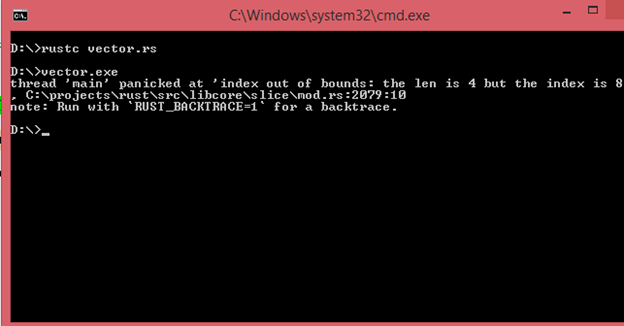
The software panics when we try to access the nonexistent element with the [] operator. Consequently, attempting to access the nonexistent element causes the program to crash. The get() method returns None without panicking if we attempt to retrieve the element using that way.
Example:
- get(index)
					fn value(n:Option<&i32>)
{
 match n
 {
   Some(n)=>println!("Fourth element of a vector is {}",n),
   None=>println!("None"),
 }
}
fn main()
{
let v =vec![20,30,40,50];
let a: Option<&i32>=v.get(7);
value(a);
}
Output:
None
- [ ] operator
					fn main()
{
let v =vec![20,30,40,50];
println!("{}",v[8]);
}
Output:
Iterating over the values in a vector
Rather to using the indexes to access a specific member of a vector, we can iterate over the vector’s elements if we wish to access every element.
To iterate over the changeable or immutable references, we can use the ‘for’ loop.
Example:
					fn main()
{
let v =vec![20,30,40,50];
print!("Elements of vector are :");
for i in v
{
  print!("{} ",i);
}
            }
Output:
Fourth element of a vector is 50
Example:
					fn main()
{
let mut v =vec![20,30,40,50];
print!("Elements of vector are :");
for i in &mut v
{
*i+=20;
  print!("{} ",i);
}
}
Output:
Elements of vector are :20 30 40 50
We are altering the vector’s value in the example above. The vector is a changeable reference as a result. To obtain the value of vector v, the dereference(*) operator is applied prior to the ‘i’ variable.
Updating a vector
The push() method is used to insert the elements into the vector once it has been created. The new element is inserted at the end of the vector by the push() method.
Example:
					fn main()
{
  let mut v=Vec::new();
  v.push('j');
  v.push('a');
  v.push('v');
  v.push('a');
  for i in v
  {
    print!("{}",i);
  }
}
Output:
java
The push() function is used in the example above to runtime insert the elements into the vector. We can alter the value of a vector by making the vector ‘v’ changeable.
Dropping a vector
A vector is automatically dropped or released from memory when it leaves the scope.
Let’s use a straightforward example to better grasp this:
					fn main()
{
   let v = !vec[30,40,50];
   } => v is freed here as it goes out of the scope.
When a vector in the aforementioned case exits its scope, all of its components are eliminated, making the vector free.
Using Enum to store multiple types
One major drawback of vectors is that they can only hold items of the same type. Enum is a form of custom data that holds variations of different types under a single enum name. The enum type is used when we wish to store the elements in a vector of a different type.
Example:
					#[derive(Debug)]
enum Values {
   A(i32),
   B(f64),
   C(String),
}

fn main()
{
     let v = vec![Values::A(5),
     Values::B(10.7),Values::C(String::from("javaTpoint"))];
     for i in v
    {
       println!("{:?}",i);
     }
}
Output:
					A(5)
B(10.7)
C(javaTpoint)
Advantages of using enum in a vector:
- In order to calculate the amount of heap memory needed for each element, Rust knows the type of items in a vector at compile time.
- Using an enum with a match will guarantee that every scenario can be handled at runtime. When a vector has elements of one or more types, operations performed on the elements will result in an error.

